
Kiosk Accessibility Standards: What CSA B651.2, the ADA and AODA Require
What the standards ask of a public kiosk, which rules apply where, and how the Duraline Angled Accessibility Kiosk is designed to CSA/ASC B651.2:25.
Looking for how humankiosk.com itself meets WCAG? Read our website accessibility statement.
One in four of your users has a disability
of Canadians aged 15 and over had a disability in 2022, rising to 40% of those aged 65 and over.1
US adults have a disability.2
of Canadians were 65 or older in 2025.3
When a counter becomes a kiosk, everyone who used the counter has to be able to use the kiosk. The key dates below show how quickly the rules have caught up.
An accessible kiosk has two halves
The hardware. Where the screen sits, whether a wheelchair user can pull in close, whether the touch screen works with a prosthetic, whether there is a tactile keypad and a headphone jack, whether the kiosk stays put when someone leans on it. This is the part humanKIOSK builds.
The software. Whether every function is spoken aloud, whether the text is large and high-contrast enough, whether the keypad can drive every screen, whether the user gets enough time. This is the application that runs on the kiosk, supplied by you or your software partner.
CSA/ASC B651.2:25 makes the point itself: the design requirements for a self-service device depend on its installation, software and hardware all working together.4 An accessible enclosure running an inaccessible application is still an inaccessible kiosk.
The closed functionality problem
On a laptop, a blind user brings their own screen reader. On a public kiosk they can't: they can't install software, plug in a keyboard or change the settings. Accessibility standards call this "closed functionality", and they put the burden on the kiosk itself.
- The US Section 508 standards name "information kiosks" as closed systems that must be "operable without requiring the user to attach or install assistive technology other than personal headsets or other audio couplers."5
- European standard EN 301 549 sets the same principle for closed ICT in clause 5.1.2.2.6
- CSA/ASC B651.2:25 requires every function of an interactive device to work, at minimum, in both visual text and audible speech.4
So the kiosk has to supply what the user would otherwise bring: speech output, a tactile way to navigate, volume control and a private way to listen.
What CSA/ASC B651.2:25 requires
CSA/ASC B651.2:25, Accessible design for self-service interactive devices including automated banking machines, is the National Standard of Canada for kiosks, self-check-in devices, ticket machines and similar devices. It is published by CSA Group and Accessibility Standards Canada and covers design, manufacture, site preparation and installation.4 Its main requirements, in plain language:
Information and audio
| Requirement | What the standard asks for | Clause |
|---|---|---|
| Two ways to get information | Every function available in visual text and audible speech; information available by sight and by hearing | 4.2.1, 4.2.2 |
| Important notices | Delivered in at least two ways, for example on screen with a sound cue | 4.2.3 |
| User control | The user can adjust the output, for example the volume, and can switch off a mode, for example blanking the screen for privacy | 4.2.4, 4.2.6.2 |
| Language | Plain-language audio and written instructions in English and French | 4.1.2 |
| Starting audio | Plugging headphones into a jack beside the screen, or touching a marked area next to a tactile identifier on the bezel, starts the audio instructions | 10.3.2.2 |
| Headphone jack | Takes 3.5 mm stereo and mono plugs; to the right of the screen, with a funnel-shaped surround and a tactile headphone symbol | 10.7.4.2 |
| Volume | User-adjustable, starting at mid-range and returning to the default when the transactions are complete | 10.7.4.1 |
| Hearing loop | Where fitted, in addition to a headphone jack or handset, switching off when they are in use, and installed to IEC 60118-4 | 10.7.4.4 |
Input and touch
| Requirement | What the standard asks for | Clause |
|---|---|---|
| Tactile input | The device can be operated with a tactile input device such as a keypad | 4.2.5 |
| Easy to operate | Where hand controls are used, at least one mode usable with one hand, without tight grasping, pinching or twisting of the wrist, with no more than 22 N of force, seated or standing | 4.2.7 |
| Touch screen | Usable with a prosthetic limb or stylus, with audible and visible feedback for every action | 10.3.2.1 |
Approach, height and screen
| Requirement | What the standard asks for | Clause |
|---|---|---|
| Wheelchair approach | Knee and toe space at least 820 mm wide, 685 mm high and 430 mm deep for a forward approach | 9.1.2 |
| Height of controls | The centreline of operating controls and input and output components between 400 and 1,200 mm from the floor | 10.1.2 |
| Screen | Viewable seated and standing, bright enough for the conditions, with reflections minimized | 10.3.1 |
Stability
| Requirement | What the standard asks for | Clause |
|---|---|---|
| Stability | Floor-mounted enclosures meet the stability tests in Annex B, because people hold on to them | 10.2 |
Software
| Requirement | What the standard asks for | Clause |
|---|---|---|
| The application | Contrast, font size, timing, feedback, captions and the order of audio instructions | 11 |
What the site has to provide
The standard also covers where the kiosk stands. Plan these with your architect or facilities team before the kiosk arrives:
- a forward or side approach to the kiosk, with a forward approach preferred;4
- the clear knee and toe space in front of the kiosk kept free of obstacles;
- nothing protruding more than 40 mm in front of the kiosk's interface between 900 and 1,980 mm from the floor;
- an accessible route, floor surface and clear area allowances that meet CSA/ASC B651, which the site installation instructions must cover (clause 9.5);
- lighting around the user space and on the interface panel (clause 6), and the user's operating space and floor surface (clause 8).
Installation drawings for the Duraline Angled Accessibility Kiosk show the clearances to plan for, and are available on request.
Check which edition your tender cites
CSA/ASC B651.2:25 is the second edition of CSA/ASC B651.2. It supersedes the 2022 first edition, as well as the older CSA B651.1-09 and CSA B651.2-07.4 Older references still circulate: Canada's Accessible Transportation for Persons with Disabilities Regulations, for example, still reference listed clauses of the 2007 edition (reaffirmed 2017).7 Confirm which edition your tender or regulation names before comparing products.
Other rules that apply to kiosks
| Rule | Where | What it says about kiosks |
|---|---|---|
| ADA Standards for Accessible Design | United States | Reach ranges for operable parts (section 308). Where ATMs or fare machines are provided, at least one of each type at each location must meet section 707, including speech output. Section 707 does not cover information kiosks.8 |
| 14 CFR 382.57 | US airports | Airlines must make at least 25% of the automated kiosks they own, lease or control in each location at US airports with 10,000 or more annual enplanements accessible.9 |
| Section 508 standards | US federal agencies | Information kiosks are closed systems that must work without the user's own assistive technology, with requirements for speech output and tactile controls.5 |
| HHS Section 504 rule (2024) | US recipients of HHS funding | Bars excluding a qualified person with a disability, on the basis of disability, from any program provided through kiosks; its kiosk definition includes patient check-in. It sets no technical standard for kiosks.10 |
| DOJ Title II rule (2024) | US state and local government | Covers websites and mobile apps; closed systems such as kiosks "may need to be made accessible in accordance with the existing title II regulation."11 |
| Accessible Transportation for Persons with Disabilities Regulations | Canada, federal transportation | Transportation service providers' kiosks in terminals must meet listed clauses of CAN/CSA-B651.2-07 (R2017).7 |
| Ontario Regulation 191/11 (AODA) | Ontario | Designated public sector organizations "shall incorporate accessibility features when designing, procuring or acquiring self-service kiosks"; other organizations must have regard to accessibility.12 |
| European Accessibility Act | European Union | Covers self-service terminals placed on the market after 28 June 2025, including ticketing and check-in machines, payment terminals, ATMs and interactive information terminals for covered services.13 |
Key dates
| Date | What happened |
|---|---|
| June 2022 | Canadian federal transportation kiosk requirements (ATPDR s. 11) in force7 |
| 12 December 2022 | US airlines' deadline for 25% accessible airport kiosks per location9 |
| January 2025 | CSA/ASC B651.2:25 issued4 |
| 28 June 2025 | European Accessibility Act applies to new self-service terminals13 |
| 26 April 2027 and 26 April 2028 | DOJ Title II web and mobile app deadlines for larger and smaller public entities (kiosks remain under the existing Title II regulation)14 |
A kiosk bought today will still be in service when the later dates arrive.
The Duraline Angled Accessibility Kiosk
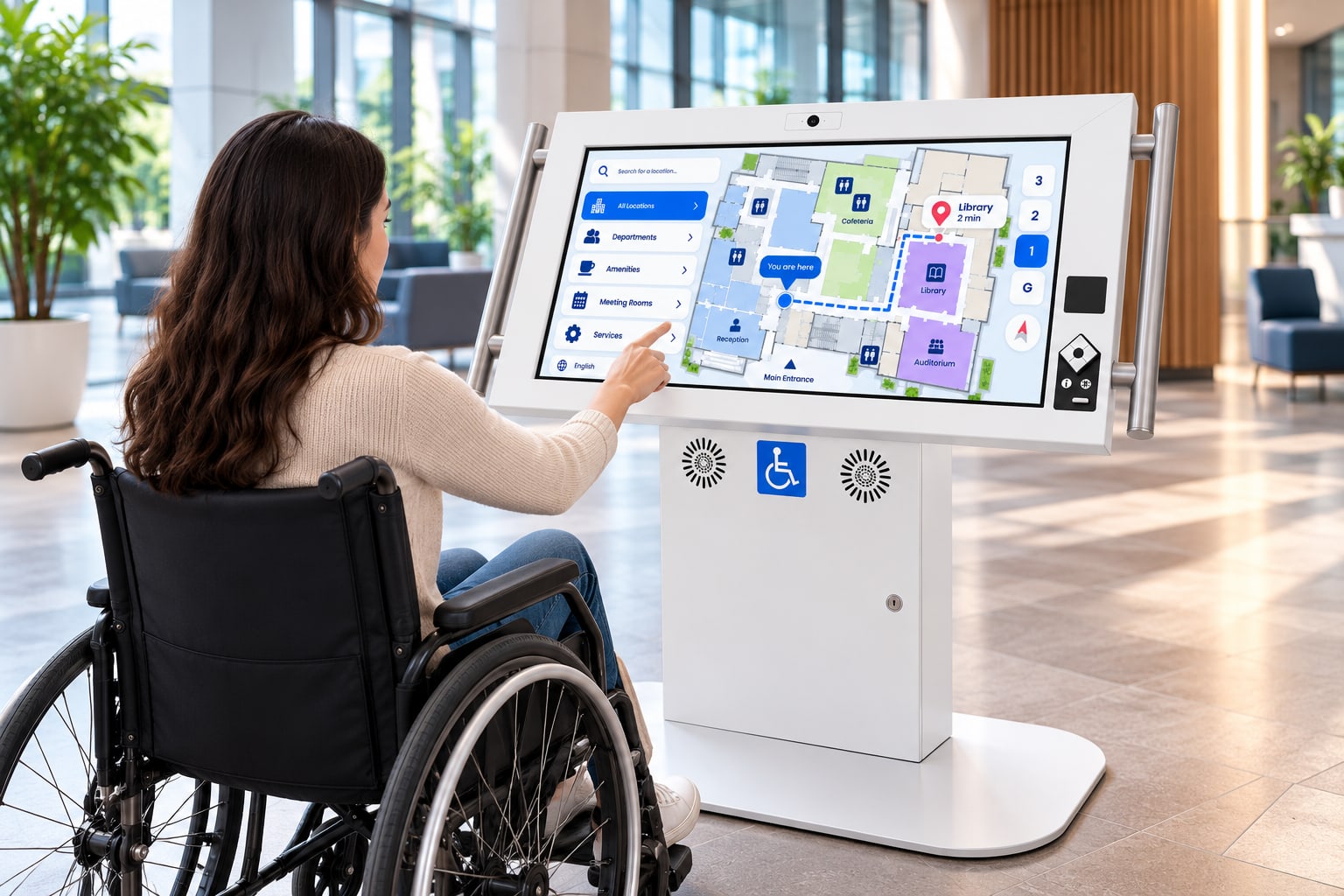
The Duraline Angled Accessibility Kiosk, in 32, 43 and 50 in, is the humanKIOSK model designed to CSA/ASC B651.2:25. It is built by Corum Digital and can be configured and customized for each project. Key accessibility features:
| Feature | Detail |
|---|---|
| Knee clearance | 685 mm high and 430 mm deep under the head, so a wheelchair user can pull in close |
| Screen | Tilted at 30 degrees, with the bottom of the display area at 807 mm |
| Keypad and scanner | Keypad top at 915 mm; optional barcode scanner window top at 1,007 mm |
| Touch | Infrared touch overlay with anti-reflective glass, which responds to a finger, a prosthetic or a stylus |
| Audio | Tactile audio keypad with an illuminated 3.5 mm headphone jack and a volume key |
| Hearing assistance | Optional assistive listening package with an induction loop and Auracast broadcast audio |
| Support | Contrasting grab bars rated to 1.3 kN; floor-mounted enclosure |
| Approach surface | A 6 mm base plate a wheelchair rolls onto, with a matte, slip-resistant finish |
| Identification | The International Pictogram of Access on the pedestal |
| Contrast | Each custom colour is checked against the contrast requirements for grab bars and controls before production |
| Peripherals | Optional 1D/2D barcode scanner, camera, microphone, speakers and mini PC |
What your application needs to do
The kiosk provides the keypad, the headphone jack, the touch screen and, where fitted, the speakers. The application on the screen has to use them. When you specify or build kiosk software, check that it:
- speaks every screen and function, and starts audio when headphones are plugged in;
- can be operated entirely from the keypad;
- lets the user change the volume and the text size, and blank the screen for privacy;
- uses high-contrast colours and readable fonts;
- gives the user enough time, and warns before a session times out;
- confirms every action with sound and on screen;
- offers English and French, and other languages your users need.
CSA/ASC B651.2:25 itself points to WCAG 2.1 for on-screen text contrast (clause 11.2.1). WCAG 2.2 keeps the WCAG 2.1 success criteria, apart from 4.1.1 Parsing, which is now obsolete, and adds new ones such as minimum target size.15
Accessibility documents for your tender
Tell us which standard and edition your tender names, and request info. We can provide:
- a written statement of how your kiosk configuration addresses CSA/ASC B651.2:25;
- a mapping of kiosk features to the clauses your tender cites;
- help completing accessibility evaluation matrices;
- installation drawings.
Frequently asked questions
Are all humanKIOSK kiosks designed to CSA/ASC B651.2:25?
No. The Duraline Angled Accessibility Kiosk is the humanKIOSK model designed to the standard; specify it wherever a tender cites B651.2 or scores accessibility. Our other kiosks are built for signage, wayfinding and information where weatherproofing, size or a double-sided screen comes first.
Is the accessible kiosk available for outdoor use?
No. The Duraline Angled Accessibility Kiosk is an indoor kiosk. For outdoor locations, the Duraline Outdoor range offers upright single and double-sided kiosks.
Is the kiosk certified?
The Duraline Angled Accessibility Kiosk is designed to CSA/ASC B651.2:25. Ask us for a written statement of how your configuration addresses the standard.
Does CSA/ASC B651.2 apply in the United States?
It is a Canadian standard. US projects are governed by the ADA Standards for Accessible Design and, depending on the buyer, Section 508, the HHS Section 504 rule or 14 CFR 382.57.
What does closed functionality mean?
A kiosk is a closed system: users can't attach their own screen reader or keyboard. So the kiosk must provide speech output, tactile controls and private listening itself.
Why infrared touch instead of a phone-style touch screen?
Phone-style capacitive touch screens respond to the electrical charge of skin, so they don't work with a prosthetic limb. CSA/ASC B651.2:25 requires a touch screen usable with a prosthetic or stylus, and infrared touch responds to any object that breaks its beams at the glass.
Does the kiosk speak?
The kiosk provides the headphone jack, the tactile keypad and, where fitted, the speakers. The spoken instructions come from the application running on it.
Why landscape rather than portrait?
A landscape screen meets the CSA/ASC B651.2:25 height requirements and leaves room for a wheelchair to pull in underneath.
Do you provide a VPAT?
No. We provide a written statement of how your kiosk configuration addresses CSA/ASC B651.2:25, and a mapping of features to the clauses your tender cites.
Standards and dates on this page were last reviewed on 27 October 2026.
Sources
- Statistics Canada, Canadian Survey on Disability 2022, The Daily, 1 Dec 2023. https://www150.statcan.gc.ca/n1/daily-quotidien/231201/dq231201b-eng.htm
- CDC, "Disability Impacts All of Us". https://www.cdc.gov/disability-and-health/articles-documents/disability-impacts-all-of-us-infographic.html
- Statistics Canada, The Daily, population estimates on 1 July 2025, 24 Sep 2025. https://www150.statcan.gc.ca/n1/daily-quotidien/250924/dq250924a-eng.htm
- CSA Group and Accessibility Standards Canada, CSA/ASC B651.2:25, Accessible design for self-service interactive devices including automated banking machines, January 2025: Preface, clauses 1, 4, 6, 8, 9, 10 and 11.
- US Access Board, ICT Standards and Guidelines (Section 508), E103.4, 402 and 407. https://www.access-board.gov/ict/
- ETSI, EN 301 549 V3.2.1, Accessibility requirements for ICT products and services, clause 5.1.2.2.
- Accessible Transportation for Persons with Disabilities Regulations, SOR/2019-244, s. 11. https://laws-lois.justice.gc.ca/eng/regulations/SOR-2019-244/FullText.html
- US Access Board, ADA Accessibility Standards, sections 220.1, 308 and 707. https://www.access-board.gov/ada/
- 14 CFR 382.57, Accessibility of automated airport kiosks. https://www.law.cornell.edu/cfr/text/14/382.57
- US Department of Health and Human Services, Section 504 final rule, 45 CFR 84.10 and 84.83, 89 FR 40066, 9 May 2024. https://www.govinfo.gov/content/pkg/FR-2024-05-09/html/2024-09237.htm
- US Department of Justice, Title II final rule, 89 FR 31320, 24 Apr 2024. https://www.govinfo.gov/content/pkg/FR-2024-04-24/html/2024-07758.htm
- Ontario Regulation 191/11 (Integrated Accessibility Standards), s. 6. https://www.ontario.ca/laws/regulation/110191
- Directive (EU) 2019/882 (European Accessibility Act), Art. 2(1)(b). https://eur-lex.europa.eu/legal-content/EN/TXT/HTML/?uri=CELEX:32019L0882
- US Department of Justice, Interim Final Rule extending Title II compliance dates, 20 Apr 2026. https://www.govinfo.gov/content/pkg/FR-2026-04-20/html/2026-07663.htm
- W3C Web Accessibility Initiative, "What's New in WCAG 2.2". https://www.w3.org/WAI/standards-guidelines/wcag/new-in-22/
Tell us which standard your tender cites
We'll show you in writing how the Duraline Angled Accessibility Kiosk addresses it. Integrators and resellers: become a partner.